
This report consists of details of employees regarding their arrival time and if they have been late or not. The steps to navigate through the report are as follows:
Prerequisites:
- You have your Deskera eLeave application URL in place.
- You are the administrator of the eLeave application.
- Ensure Stable Internet Connectivity.
Step 1: Click Master Configuration icon on the dashboard.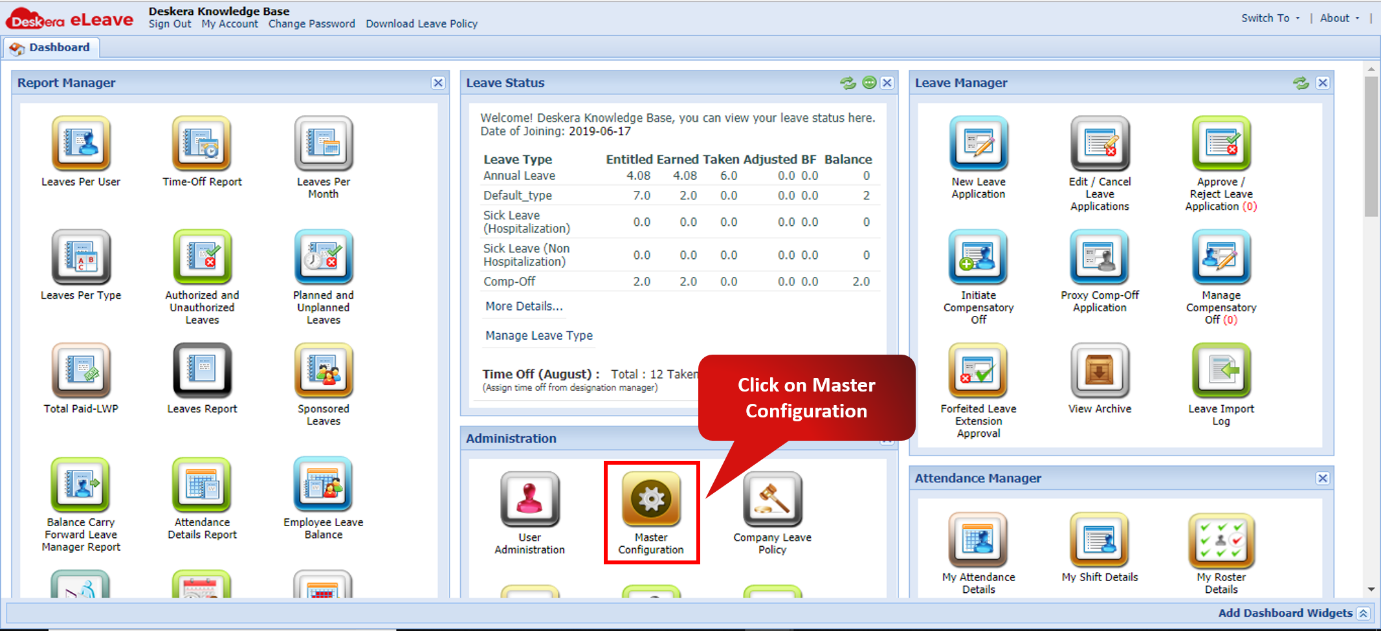 Fig. 3.6.13.1 eLeave Dashboard
Step 2: Scroll down Company Preferences panel to view Report Manager section. Tick the checkbox Employee Late Arrival Report and click Save Fig. 3.6.13.2 Master Configuration
Step 3: Click Employee Late Arrival Report icon on the dashboard. Fig. 3.6.13.3 Employee Late Arrival Report
Step 4: Expand a record to view the employee's late arrival details. Fig. 3.6.13.4 Employee Late Arrival Report
Comments
0 comments
Please sign in to leave a comment.