
Using Deskera, you can export a txt (text) file and then upload to CPF board
After you have finalised the payroll, you can download the CPF e-file.
From HRMS Dashboard, Select the CPF e-Submission file
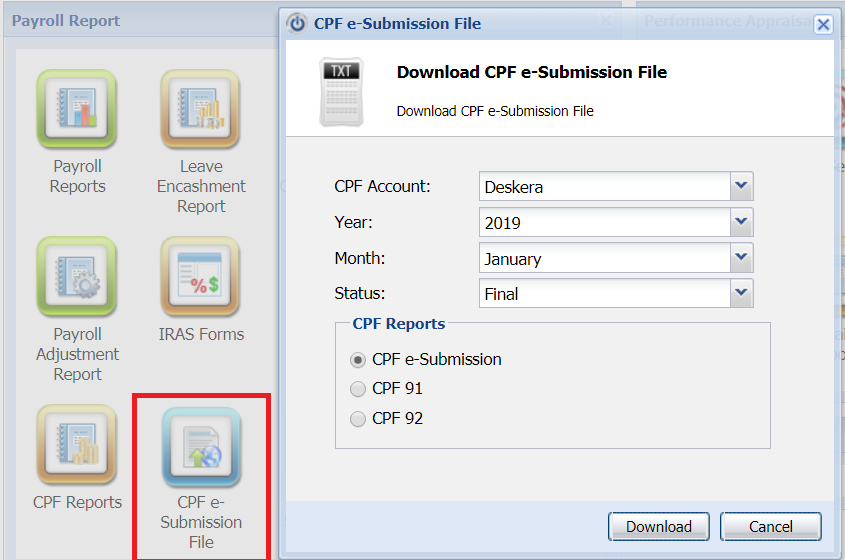
Fill in the following details:
1. Select the Company’s CPF account.
2. Select the year for which the CPF is to be paid.
3. Select the Month for which CPF is paid
4. Status: the status of the Payroll
5. Select-CPF e-Submission
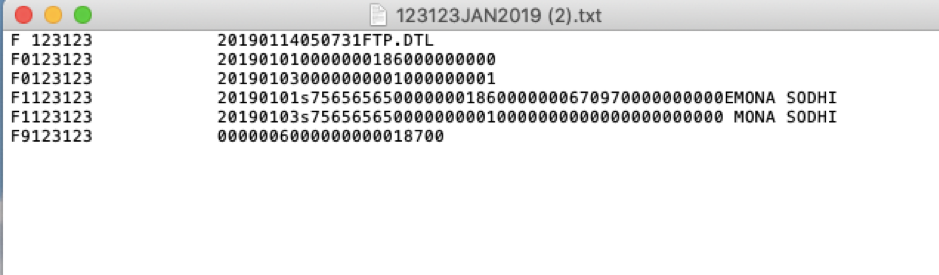
The downloaded version looks something similar to this which has to be uploaded in the CPF website as per the link below. For Windows user, you can open this file using Sublime Text instead of Notepad for better viewing.
Look further into our article if you encounter any errors whenuploading the file CPF e-submission. Common Errors
You can find more information about the file generated here:
https://www.cpf.gov.sg/Assets/employers/Documents/CPFESUBMISSIONS(EMPLOYERS)FTPFILESPECIFICATIONS.pdf
You can follow the instructions shown on CPF website to submit using e-submission.
The below link shows a video which walks through the CPF Submission process.
https://www.cpf.gov.sg/Employers/Tools/online-demos/online-demos/employer-services/cpf-e-submission/187

Comments
0 comments
Article is closed for comments.