
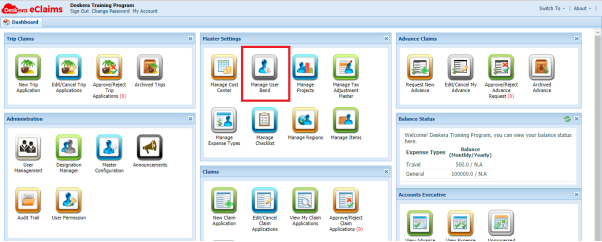
To create user band, you need to go to Manage User Band under Master Settings
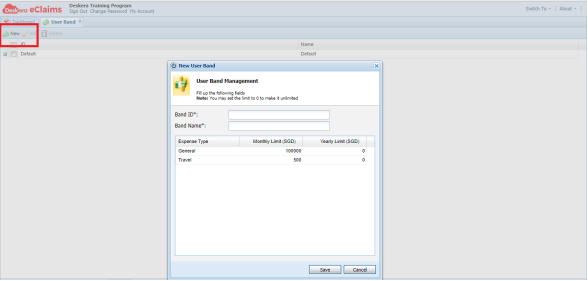
You can add new User Band by clicking New and fill in the Band ID/Name and monthly/yearly limit for each Expense Type.
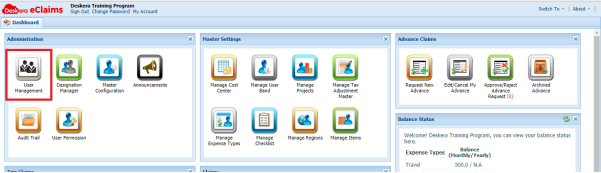
To assign the user band to a user, go to User Management under Administration
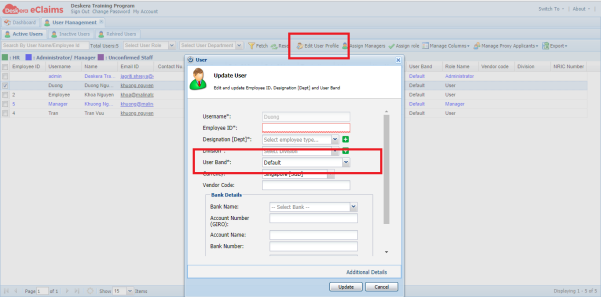
Select a user and choose Edit User Profile. You can choose User Band from the dropdown list.
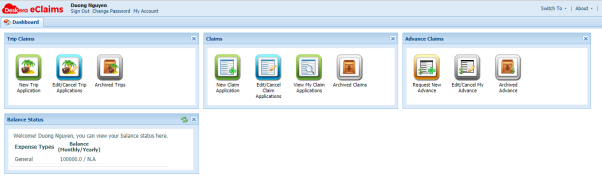
Please note that, even though the User Band “Default” provide monthly/yearly limit for both Expense Type “General” and “Travel”, if the employee has only been assigned to “General”, his Balance Status only shows “General” Expense Type with its limit
 |
Run Your Business with Deskera |
Comments
0 comments
Article is closed for comments.