
Deskera CRM provides the user with different modules like leads, accounts, opportunities, activities etc. The settings and configuration for these modules can be defined in Module Configuration under Master Configuration. This article focuses on the settings and configurations for Accounts module.
Prerequisites:
1. Ensure you have your Deskera CRM application URL in place.
2. Ensure you are the administrator/ assigned user of the CRM application.
3. Ensure a good internet connectivity.
Step 1: Go to Master Configuration under Administration on the CRM dashboard Fig.5.10.1.4.1 CRM Dashboard
Step 2: Go to Accounts under the Module Configuration Tab.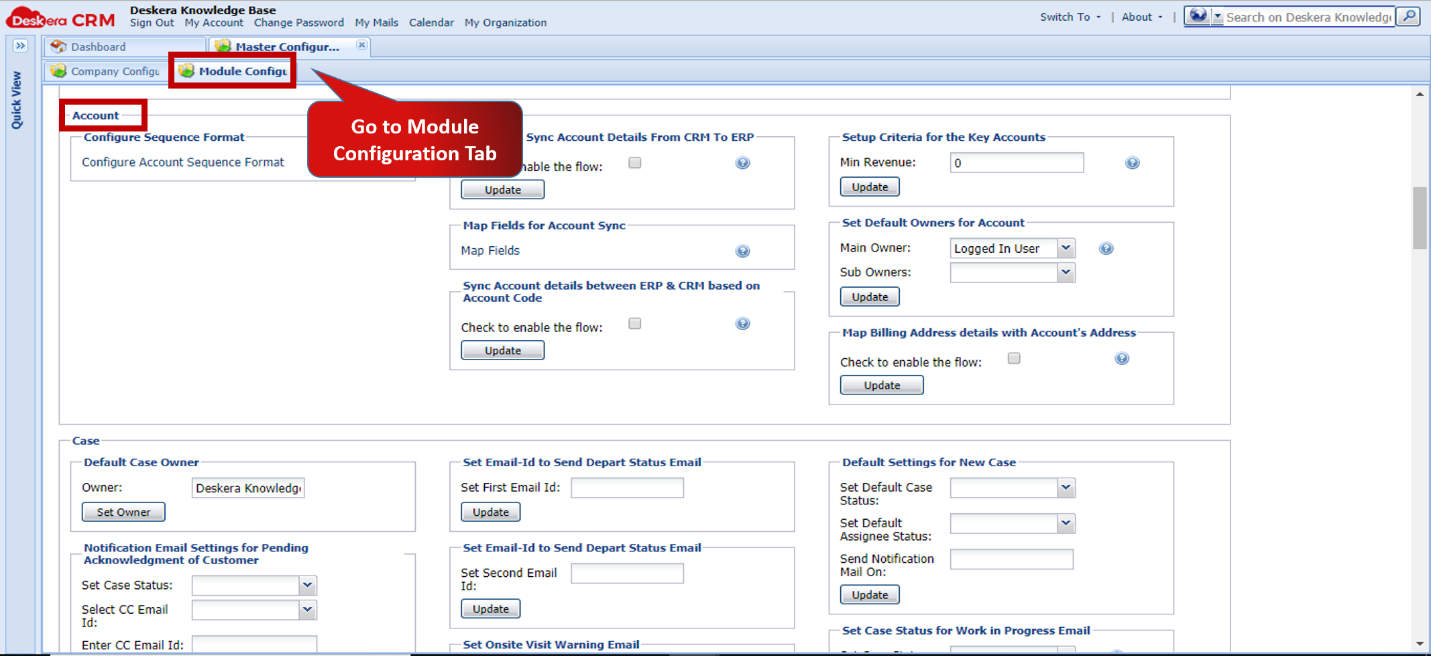 Fig.5.10.1.4.2 Module Configuration
1. Configure Sequence Format Fig.5.10.1.4.3 Module Configuration
 Fig.5.10.1.4.4 Add New Record - Account
2. Daily Auto-Sync Details from CRM to ERP Fig.5.10.1.4.5 Module Configuration
3. Map Fields for Accounts Sync Fig.5.10.1.4.6 Module Configuration
 Fig.5.10.1.4.7 Map Headers
4. Sync Account Details between ERP and CRM based on Account Code Fig.5.10.1.4.8 Module Configuration
5. Setup Criteria for Key Accounts Fig.5.10.1.4.9 Module Configuration
6. Set Default Owners for Accounts Fig.5.10.1.4.10 Module Configuration
 Fig.5.10.1.4.11 Accounts List
7. Map Billing Address details with Account’s Address Fig.5.10.1.4.12 Module Configuration
 Fig.5.10.1.4.13 Accounts List
Comments
0 comments
Please sign in to leave a comment.